Widow9 GHOST
LEAVE NO TRACE. WATCH IT WORKING.
A whole private computer on a USB stick. Plug it in, start up, and every connection goes through Tor. Switch off and it forgets everything. And unlike anything else out there, it shows you it's working, live, on a cockpit panel you can actually see.

This is a public test build. It has passed 7 of our 8 build phases, every one tested on a virtual machine and a real laptop, including a full capture of its network traffic. It hasn't been independently audited, and it's new. Please don't trust your safety to it yet. Try it, break it, tell us what you find. When it's held up in the wild, it becomes Ghost 1.0.
Ghost Control: your protection, live
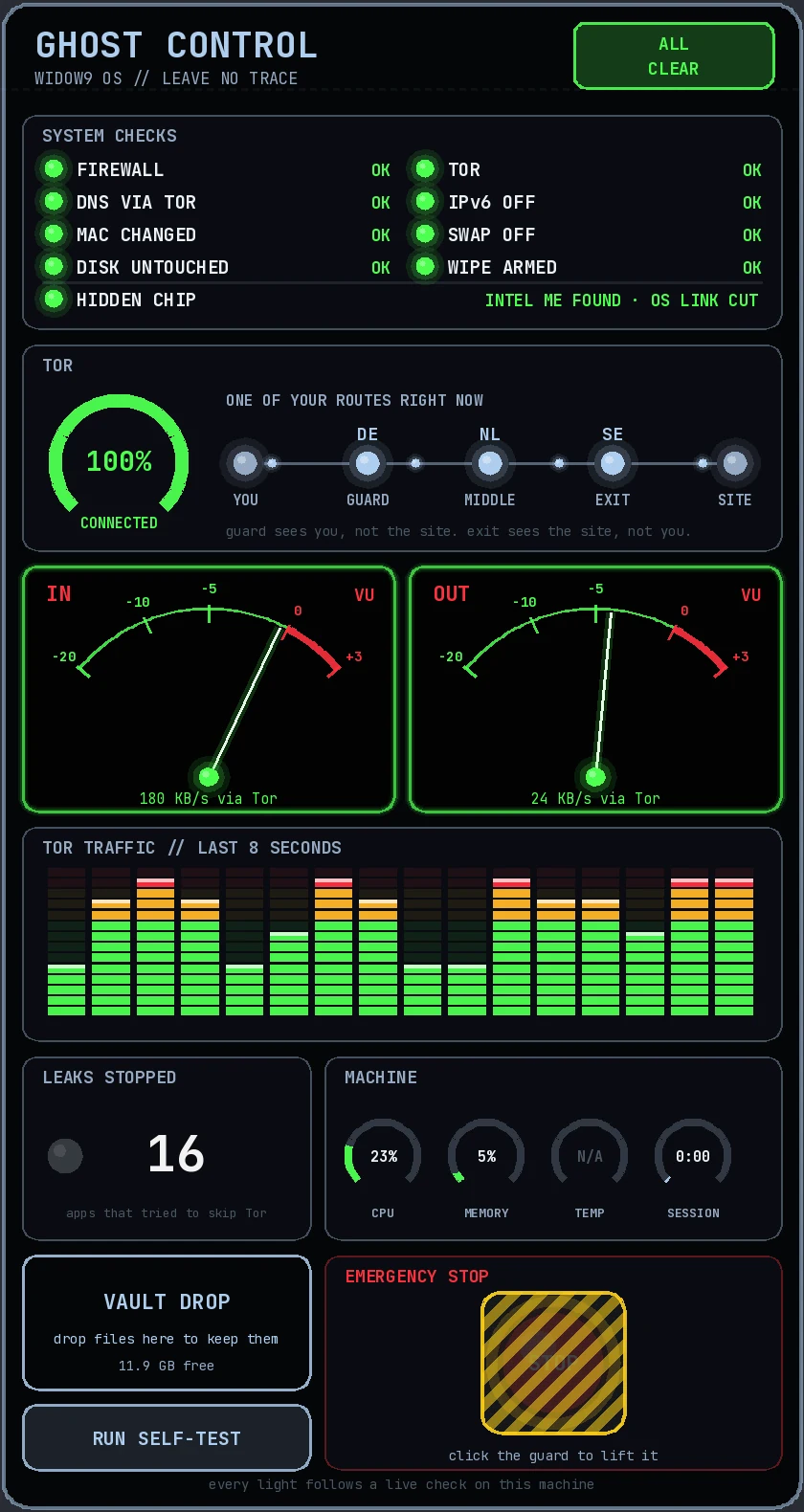
Most privacy systems ask you to trust them. Ghost shows you. Every light on this panel follows a real check on the machine, once a second.
System checks
Firewall, DNS through Tor, changed hardware address, disk untouched, IPv6 off, swap off, memory wipe armed. Green means checked, right now, on this machine.
Hidden chip NEW
Modern PCs have a hidden management computer inside the main chip (Intel ME or AMD PSP) that runs below any operating system. Ghost finds it, tells you, and cuts its own link to it. It can't switch the chip off (nothing running on the PC can), and it says so honestly. As far as we know, no other privacy system shows you this.
Your Tor route
See one of your real routes with the country of each hop: you, guard, middle, exit, site. The guard sees you but not the site; the exit sees the site but not you.
VU meters & analyser
Studio-style meters show your traffic moving through Tor in and out. If it moves, it went through Tor.
Leaks stopped
A live count of every app that tried to skip Tor and got blocked. On a normal start it's usually a dozen or more: background parts of the system trying to phone home.
Vault Drop
Drag a file onto the panel and it goes straight into your encrypted locked folder on the stick. Everything else is forgotten.
One-click self-test
Proves the claims in front of you: Tor confirmed by the Tor Project, normal apps blocked, nothing saved to the stick, hidden-chip link cut.
Guarded emergency stop
Lift the guard, press STOP: network cut, power off at once. Or press Ctrl + Alt + Shift + Q. Or just pull out the stick: in our tests the laptop was off in half a second.
Private by design, from the first second
Tor only, fail closed
A firewall starts before the network and only lets Tor out. If Tor stops, nothing gets online. DNS goes through Tor too, and IPv6 is switched off.
Forgets everything
Runs in memory. Nothing is written to the computer's drives, and since 0.4.2 nothing is saved to the stick either. Memory is wiped as programs close. No swap.
A new face on every network
A random hardware (MAC) address for every network you join, and no computer name sent to the router. On our test laptop the real address was never used once.
Optional locked folder
Keep a few things between sessions in an encrypted folder on the stick (LUKS2, AES-256), unlocked with your password at start-up. Off unless you create it.
Cyber Monk Kali tools
Optional: nmap, sqlmap, hydra and more, installed only inside your locked folder, downloaded through Tor, with proxychains set up. Lock the folder and the tools are gone. Our firewall blocks Kali from going round Tor too: we tested it. First setup takes 45 to 90 minutes through Tor.
0.4.4 tip: if proxychains says socket error, type unset https_proxy HTTPS_PROXY http_proxy HTTP_PROXY first. Fixed in the next build.
The official Tor Browser
Straight from the Tor Project, signature-checked when Ghost is built, pinned on the dock. Its own updater is switched off: new versions come with each new Ghost.
Ghost and Tails
Tails is the long-established amnesic, Tor-only system, independently audited and trusted by journalists for years. We have huge respect for it, and studied how it works while building Ghost. Ghost aims for the same outcome, with a different way of working.
| Ghost (test build) | Tails | |
|---|---|---|
| Amnesic, runs from USB | Yes | Yes |
| Everything through Tor, fail closed | Yes | Yes |
| Encrypted folder on the stick | Yes | Yes |
| Pull the stick out = emergency stop | Yes | Yes |
| Live cockpit panel proving it's working | Yes | No |
| Hidden chip detection (Intel ME / AMD PSP), link cut | Yes | No |
| Leaks-stopped counter, live Tor route with countries | Yes | No |
| Vault Drop, guarded STOP button, one-click self-test | Yes | No |
| Optional Kali tools inside the locked folder | Yes | No |
| Years of real-world use, independent audits | Not yet | Yes |
| Tor bridges for blocked networks, hotel Wi-Fi login help | Coming | Yes |
Why build Ghost? Because privacy shouldn't feel like a black box. Ghost is built for people leaving Windows and for Cyber Monk learners: it shows you what's protecting you, teaches you what each part does, and keeps the free-party DIY spirit. If your safety depends on it today, choose a mature, independently audited system. If you want to see your protection working and help build something new, try Ghost.
Get Ghost 0.4.4 (public test build)
Widow9 Ghost 0.4.4 · 64-bit
- File
widow9-ghost-0.4.4-amd64.iso- Size
- 3.4 GB
- Needs
- 64-bit PC, 4 GB RAM (8 GB comfortable), USB stick 8 GB or bigger (16 GB+ for Kali tools)
- Based on
- Widow9 OS 1.0.10 / Linux Mint 22.3
Free, always. No account, no tracking. If it impresses you, ☕ fuel the build.
SHA-256 checksum
883ceb3fcc080fb583deddc33de7b8930ea3c9d807d8197054cadaa78a0d8357Fuel the build
Ghost is built by one person in Yorkshire, with no investors, no adverts and no data to sell. Coffees pay for test laptops, leak testing, hosting the downloads, and the road to Ghost 1.0.
☕ Buy us a coffeeOpens PayPal. Any amount helps, and it never unlocks anything: Ghost stays free for everyone. No spare cash? Share this page. That helps too.
Make your Ghost stick
- Check the download is genuine. Windows: open PowerShell in Downloads and type
Get-FileHash widow9-ghost-0.4.4-amd64.iso. Linux or Mac:sha256sum widow9-ghost-0.4.4-amd64.iso. It must match the checksum above exactly. - Write it to a USB stick (8 GB or bigger, everything on it will be wiped).
- Windows: Rufus. Pick the stick and the ISO, press START. When a box called ISOHybrid image detected appears, choose Write in DD Image mode. This matters: it leaves room for your locked folder.
- Mac, Linux or Windows: balenaEtcher writes it the right way automatically.
- If Windows then says the stick needs formatting, click Cancel. That's normal: Windows can't read it.
- Start the PC from the stick. Switch it off, plug in the stick, power on and tap the boot menu key (often F12, F11, F9, F8 or Esc). Pick the USB entry. Only use the one-time boot menu: you don't need to change any BIOS settings.
- Ghost Welcome: pick your keyboard, create or unlock your locked folder if you want one, then Start Ghost. Connect to Wi-Fi and wait for Tor to reach 100% on Ghost Control.
- Prove it: press RUN SELF-TEST on the panel. Every line should say PASS.
Doesn't start? If the PC shows a security message, it may need Secure Boot switched off: check with someone you trust first, and never change BIOS settings on a work or school computer. Ask in the group with a photo of the screen.
What Ghost protects, and what it doesn't
Helps protect you from
- Websites, trackers and your internet provider seeing who you are and what you visit
- Apps leaking around Tor: they're blocked and counted
- Traces left on the computer you used
- Your Wi-Fi router logging your real hardware address
- Someone opening your locked folder without the password
Can't protect you from
- You logging in to your own accounts: then the site knows it's you
- A compromised computer: hardware keyloggers, tampered firmware, the hidden chip itself
- Someone watching both ends of a Tor connection at once
- Forgetting your locked-folder password: nobody can recover it, not even us
- Bugs we haven't found yet. That's why it's a test build
Using the Kali tools? Only test systems you own or have written permission to test (in the UK, the Computer Misuse Act applies), and please don't scan through the Tor network.
Tell us what you find
Post in the Widow9 Facebook group or email support@mampitech.com. Most useful: your laptop or PC model, a photo of the self-test and of anything that looks wrong. AMD (Ryzen) owners: a photo of the HIDDEN CHIP line is gold. Please never send logs or screenshots with your own details in them.
Found a security problem? See Report a security issue.